Salesforce Classic is Frozen: Why a Proactive Lightning Migration Audit is Now Essential
March 23
CRM Configuration
Blogs

Many organizations who built their CRM operations on Salesforce Classic have noticed a shifting landscape. For years, Classic provided reliability and familiarity. However, Salesforce’s focus has steadily, though quietly, moved toward Lightning Experience. While there hasn’t been an official retirement announcement for Classic, its development has slowed to a halt. Classic is effectively frozen in time, while Lightning receives all new features, security enhancements, and user experience updates. This puts businesses in a position where depending on Classic feels increasingly risky and not because of a sudden cutoff, but because the gap between Classic and Lightning will only widen as time goes on.
This gradual progression toward Lightning means that small and medium-sized corporations relying on Classic need to proactively audit their environment and plan a thoughtful, disruption-free migration. Instead of waiting to react to an abrupt retirement, it is vital to stay ahead of the curve as the platform’s momentum shifts. At OMI, we guide organizations through this nuanced journey, helping you identify what will break, what needs to be modified, and how to build a safe and efficient Lightning migration roadmap. We always keep your business continuity and objectives at the forefront.
Why Salesforce Classic Is Frozen and Why That Matters
Salesforce Classic is no longer being enhanced or updated, while Lightning Experience continuously evolves. Although Classic will continue to exist for now, it is being left behind. For organizations still running business-critical workflows on Classic, this has several implications:
- Security vulnerabilities may arise as Classic does not receive the latest protective updates
- New Salesforce innovations and productivity tools are Lightning-only
- Third-party vendors are prioritizing compatibility with Lightning, potentially leaving Classic users with outdated integrations
- Internal support resources are shrinking as more admins and consultants focus on Lightning skills
The risk is not that Classic will suddenly switch off. Over time, its compatibility, security, and business value steadily degrade. For leadership, the question shifts from "When do we have to migrate?" to "How do we ensure our CRM keeps up with our business needs and industry standards?"
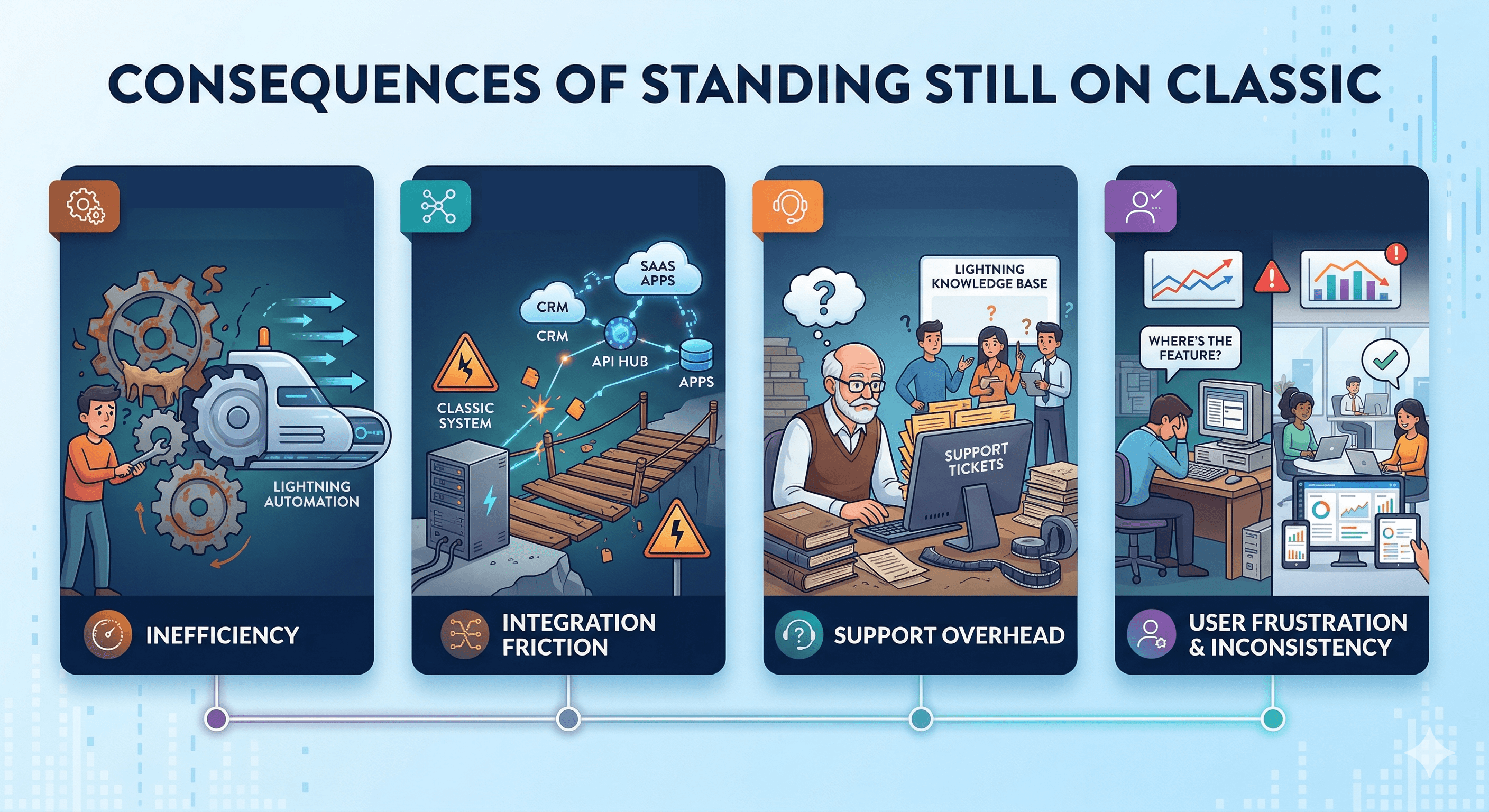
Consequences of Standing Still on Classic
- Gradual loss of business process efficiency as Lightning-exclusive automation tools emerge
- Increasing friction or outright failures with integrations that rely on Lightning APIs
- Growing support overhead as Classic knowledge becomes scarce
- User frustration due to outdated interface and missing features compared to modern standards
- Potential data and reporting inconsistencies if Lightning capabilities are required by leadership or boards
The Fastest, Safest Approach: Conduct a Lightning Migration Audit
With the inevitability of Salesforce’s future being Lightning-first, a proactive audit is the best defense against unpleasant surprises. At OMI, our approach is both comprehensive and streamlined, focusing specifically on your organization’s unique footprint.
Step 1: Map Your Classic Landscape
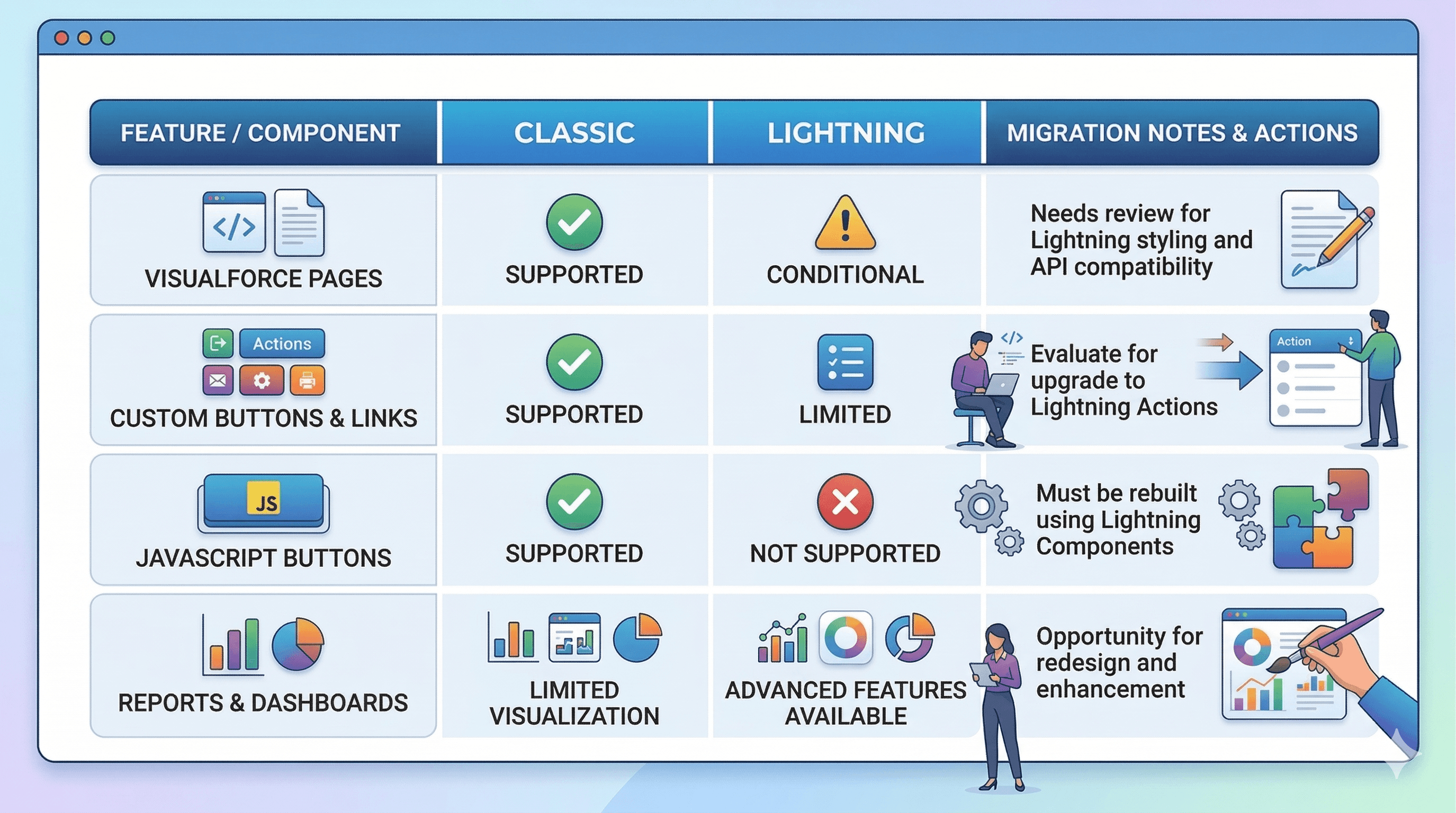
- Inventory every object, workflow, Visualforce page, button, and user-facing component that your business relies on
- Catalog user roles, profiles, and page layouts to determine where user experience changes will be most significant
- Document external integrations (ERP, marketing, business intelligence, legacy APIs), noting dependencies that are tied to Classic
- List the reports and dashboards in regular business use
Step 2: Assess for Lightning Compatibility
- Use the Salesforce Lightning Readiness tools, but also conduct a manual review of Visualforce, APEX, and integration code
- Check custom buttons, JavaScript, and workflow rules for Lightning support or required replacement
- Review all managed packages and app marketplace add-ons for Lightning support status
Step 3: Identify Business and Technical Risks
- Score each customization or integration for business impact and migration complexity
- Highlight Classic-only automations and UIs that must be redesigned or replaced
- Develop mitigation plans for items requiring substantial refactoring or new Lightning-first approaches
Step 4: Craft a Phased Roadmap
- Begin with simpler, high-value transitions (standard objects and out-of-the-box features) before tackling complex custom code
- Prioritize training for users and administrative staff to smooth the adoption curve
- Implement rigorous user acceptance testing at every stage to ensure continuity and capture feedback
Salesforce Classic vs Lightning: Side-by-Side Compatibility Table
How OMI Supports Your Safe Lightning Migration
We believe that migrating from Classic to Lightning is not just a technical task. It is a holistic business transformation. With nearly 30 years of CRM expertise and deep Salesforce knowledge, our approach is tailored to your current processes, technologies, and people. Here is how we differ:
- Conducting in-depth discovery workshops to fully map your Classic environment so no stone is left unturned
- Providing a transparent and prioritized impact report that highlights the most sensitive process areas
- Developing comprehensive, custom remediation plans for integrations, workflows, and custom code
- Partnering with you through migration, UAT, rollout, training, and ongoing managed services support
- Helping your business unlock new Lightning-only benefits (whether productivity features, workflow automation, or analytics)
We focus not just on ensuring things do not break. We help you improve user experience and operational agility in the process. For more tips on building a scalable and efficient CRM ecosystem, see our Salesforce efficiency optimization guide.
Best Practices for a Future-Proof Lightning Migration
- Begin with a Comprehensive Audit: Use automated Lightning readiness checks, but don’t rely on these alone. Manual review by experts catches what automated tools might miss.
- Engage Every Stakeholder Early: The fastest migrations have business users, IT, and executive sponsors aligned right from the beginning.
- Prototype Your Most Critical Workflows: Before you migrate, stand up Lightning sandboxes and test your business-critical operations for gaps or friction.
- Deliver Role-Based Training: Segment your end-user training by department and job profile to drive faster adoption and minimize disruption.
- Iterate and Optimize Using Feedback Loops: With our managed services, we guide you post-migration, incorporating feedback and ensuring Lightning works for you and not the other way around.
If you want to go even deeper into strategies for minimizing disruption, our post on minimizing CRM migration downtime and maximizing user adoption offers practical steps and frameworks.
Migration: In-House vs Partner-Led vs Automated Tools
- In-House: This may work for organizations with highly skilled Salesforce staff, but the overhead and risk often outweigh the benefits for all but the largest teams.
- Third-Party Automation: Handy for some technical aspects, but usually not deep enough on your bespoke business logic and workflows.
- Expert Consulting (OMI): Offers hands-on, business-centric, and experience-driven approaches, ensuring both technical and process requirements are covered.
As highlighted by leading analysts, successful migrations require multidisciplinary expertise, business context, rigorous testing, and ongoing optimization. These foundations are central to the OMI approach.
Conclusion
The shift away from Salesforce Classic is not a sudden announcement. It is a slow and predictable evolution. For small and medium-sized organizations, there is immense opportunity in proactively mapping and migrating your CRM to Lightning. You can avoid risks and reimagine how your technology supports growth and agility. The key is a thorough, business-focused audit and migration strategy, with expert guidance at every step.
If you’re ready to audit, remediate, and future-proof your Salesforce investment, connect with OMI. Connect with OMI to discuss your Salesforce migration strategy. We work side-by-side with you to keep your CRM working for you.
Frequently Asked Questions (FAQs)
- Is Salesforce Classic being retired soon? While there is no official retirement date, Salesforce development has effectively frozen. All security updates, new features, and innovations are now Lightning-exclusive. Staying on Classic means your CRM is no longer evolving with your business.
- Can we keep running Classic indefinitely? Classic is still accessible. But over time, its compatibility, security, and integration options will diminish as the ecosystem progresses. Waiting exposes you to incremental technical debt and operational risk.
- How do we know what will break in Lightning? Automated tools provide a baseline, but a manual, proactive migration audit is the only way to ensure 100% continuity. OMI performs a deep-dive review of your custom UI, Apex code, and complex integrations to identify every potential point of failure before the move begins.
- If we lack internal expertise, can we still migrate safely? Absolutely. Many mid-sized organizations lack the dedicated resources for a major transition. OMI provides the technical coverage and strategic roadmap needed to fill those gaps, ensuring a safe, efficient, and expert-led migration.
- What is the business case for migrating now rather than waiting? Proactive migration eliminates the risk of a reactive, "emergency" move later. By migrating now, you gain immediate access to Lightning-only productivity tools, modern AI capabilities, and secure integrations that position your organization for long-term growth.
Want more practical strategies for CRM management and transformation? Browse our CRM insights and best practices blog for detailed guides on Salesforce deployments, workflow automation, AI integration, and more.