Exploring Microsoft Dynamics 365 Modules (2026 Guide) – OMI
February 16
Microsoft Dynamics
Blogs
If you are planning your 2026 tech roadmap, thinking in “modules” matters. Microsoft Dynamics 365 is no longer a single monolithic suite. It is a collection of cloud apps that snap together, share data through Dataverse, and now come with Copilot capabilities that automate routine work across sales, service, finance, operations, and even field teams. The result is a platform that scales with you, instead of forcing you to buy everything on day one.
This guide is written for business owners, IT leaders, and decision-makers who want a clear, vendor-neutral view of how the major Dynamics 365 modules fit together, how licensing really works, what changed in 2025, and what to expect in 2026. Where it helps, we include quick glossaries and official docs so you can drill deeper.
We also include OMI’s take on pragmatic selection and licensing patterns that we hear in the field, including base plus attach strategies, Team Member scenarios, and device or tenant licenses for shared environments.
Understanding Microsoft Dynamics 365 Modules
What is a “module” in Dynamics 365?
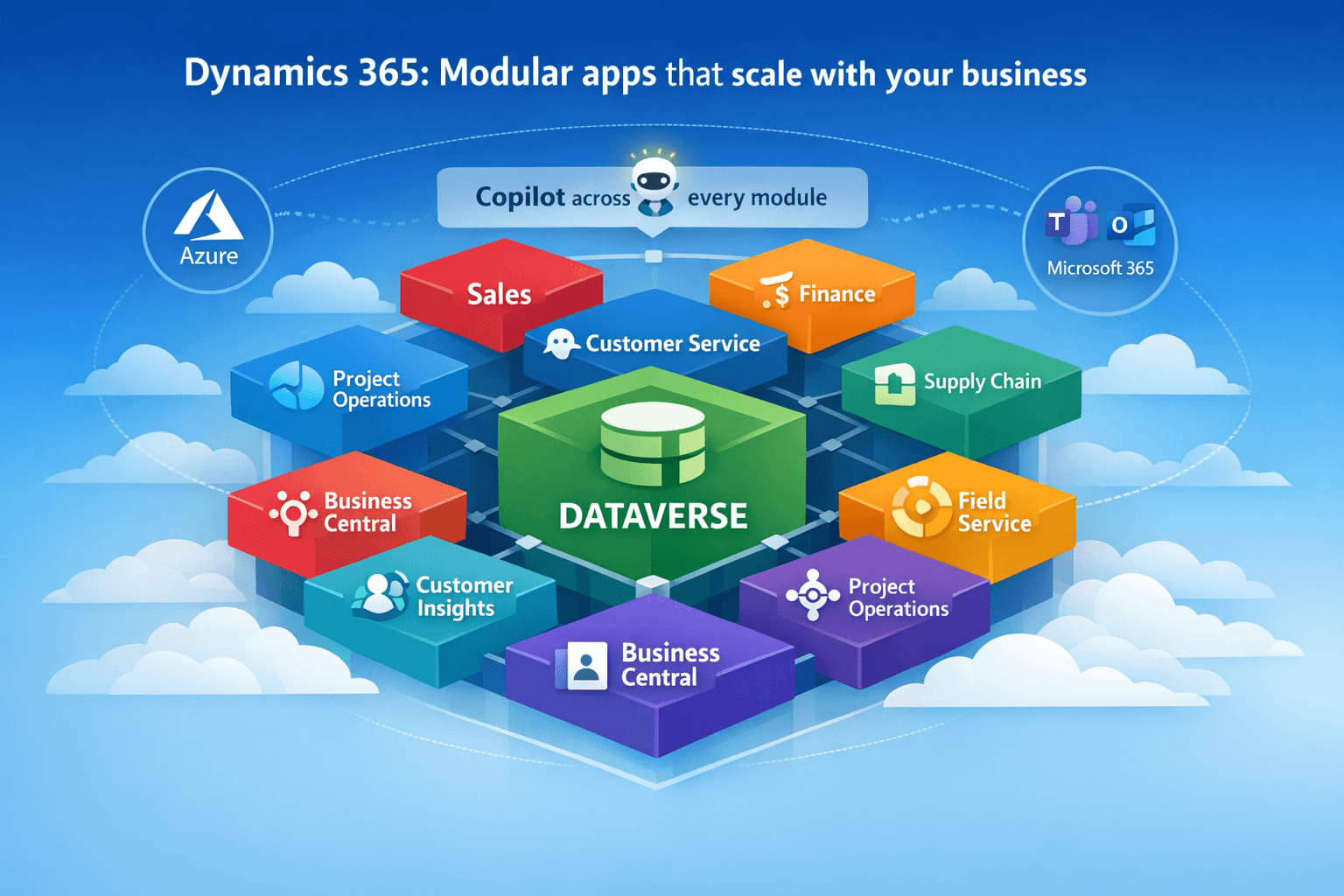
Think of modules as specialized cloud apps that solve focused problems. Sales for CRM pipeline management. Customer Service for case and knowledge. Finance for general ledger and FP&A. Supply Chain Management for planning, production, and warehousing. Each module runs in the cloud, is customizable, and integrates through Dataverse and the Power Platform.
How modules work together
Modules are designed to interoperate out of the box across a common data layer. Dual-write, virtual tables, and Dataverse connectors keep Finance and Operations apps in sync with Customer Engagement apps like Sales and Customer Service. That means fewer exports, less manual reconciliation, and better near-real-time analytics.
Where Azure and Microsoft 365 fit
Dynamics 365 and Power Platform are built on Azure, so integration patterns for storage, events, analytics, and security are familiar to your cloud team. Microsoft 365 provides collaboration and productivity layers like Teams and Outlook that are increasingly linked with Dynamics scenarios, especially as Copilot becomes standard in the stack.
Industry applicability
Manufacturing, retail, healthcare, financial services, and professional services all use the same core modules with industry templates and reference architectures that speed time to value.
Microsoft Dynamics 365 Modules List
The core categories below reflect Microsoft’s current release plan taxonomy for 2025–26. It includes Sales, Customer Service, Contact Center, Field Service, Finance, Supply Chain Management, Project Operations, Human Resources, Commerce, Business Central, and Customer Insights for data and real-time journeys.
Dynamics 365 ERP Modules: Features, Benefits, and Use Cases
Finance
- What it does: Core accounting, global entities, reporting, and FP&A.
- Benefits: Strong governance, consolidation, and planning.
- Use cases: Multi-entity close and subscription billing with Copilot-assisted analysis.
- Why now: Microsoft continues to invest in AI-assisted planning and analytics in the 2025 release waves.
Supply Chain Management
- What it does: Planning, procurement, production, and warehouse and asset management.
- Benefits: Improved visibility, risk mitigation, and better on-time delivery.
- Use cases: Demand planning, supplier collaboration, and predictive maintenance.
- Why now: New Copilot features and premium capabilities target faster responses to disruption.
Dynamics 365 CRM Modules: Features, Benefits, and Use Cases
Sales
- What it does: Lead to opportunity management, forecasting, and sales acceleration.
- Benefits: Guided selling with Copilot surfacing risks and next best actions.
- Use cases: Complex B2B sales, territory planning, and pipeline inspection.
- Why now: Microsoft’s 2025 wave added more autonomous agent features that research, summarize, and assist sellers inside daily workflow.
Customer Service
- What it does: Omni-channel case management, knowledge, and SLAs.
- Benefits: Faster resolution with Copilot for agents and AI-driven routing.
- Use cases: Support centers, knowledge-first deflection, and self-service portals.
Contact Center
- What it does: A Copilot-first contact center product with digital and voice, plus routing and analytics.
- Benefits: Lower handle time, higher first contact resolution, and integrated voicebot capacity.
- Use cases: Modernize legacy CCaaS, unify CRM and telephony, and scale seasonal volume
Field Service
- What it does: Work orders, scheduling, mobile technician tools.
- Benefits: Higher first-time fix and faster scheduling.
- Use cases: Utilities, industrial equipment, and medical device servicing.
Marketing is now Customer Insights – Journeys
Microsoft consolidated marketing automation into Customer Insights. You orchestrate real-time journeys and connect data and channels without duplicative tools.
AI-Driven Modules in Dynamics 365: Features, Benefits, and Use Cases
Customer Insights – Data and Journeys
Unified profiles and activation across channels. Copilot-assisted segments and content. In 2025–26, Microsoft continues to expand real-time capabilities and agent intelligence.
Copilot across Sales, Service, and Finance
Microsoft is bundling Copilot for Sales, Service, and Finance into Microsoft 365 Copilot from October 2025, which simplifies licensing for many customers planning 2026 rollouts. This change helps teams access core AI features without stacking separate add-ons.
Mixed Reality Modules: Features, Benefits, and Use Cases
Dynamics 365 Guides
Dynamics 365 Guides puts clear, step-by-step holographic instructions right in a worker’s view on HoloLens, so people learn by doing and keep their hands free. Steps appear next to the real equipment, with photos, short videos, and 3D models to make tricky actions easy to understand. Voice and gaze controls keep the flow natural.
Teams use Guides to speed up onboarding, reduce errors by standardizing procedures, and capture expert knowledge once, so everyone can follow it. It’s a strong fit for manufacturing tasks like assembly and changeovers, maintenance routines, and part swaps, and safety-critical workflows such as lockout or calibration, where consistency really matters.
Dynamics 365 Remote Assist
Dynamics 365 Remote Assist lets an expert see what the technician sees and coach them through a fix over a secure Microsoft Teams call. With HoloLens or a mobile device, the expert can add anchored annotations on real objects, share manuals or drawings in the call, and save notes and images back to the work order.
The result is faster resolution, fewer costly site visits, and less downtime for production lines or field assets. It shines in field service and utilities for on-site repairs, in facilities and construction for inspections and punch lists, and for specialty equipment vendors supporting dealers and customers in real time.
Microsoft has deprecated the legacy standalone mobile app, but the same scenarios now run inside Teams mobile, and HoloLens remains supported for true hands-free work. Many organizations already licensed for Dynamics 365 Field Service find they have mixed reality entitlements included, which can make rollout much simpler.
Quick way to choose
Use Guides when you want to teach and repeat the best-known steps the same way every time. Use Remote Assist when today’s issue is unique and you need an expert at the moment. Most teams combine both training with Guides and escalating tricky cases through Remote Assist when needed.
Modular Applications: Features, Benefits, and Use Cases
Business Central
An all-in-one business management app for finance, inventory, projects, and light manufacturing. Great for growing companies or divisions that want ERP without heavy implementation
Customer Voice
Tenant-based feedback management that integrates with Customer Service and Sales. Typical use cases include CSAT, NPS, and journey-triggered surveys.
Note on changes: Dynamics 365 Fraud Protection is being sunset for new purchases, with support ending in 2026. If you still rely on it, plan your transition in 2025–26.
How to Choose the Right Dynamics 365 Modules for Your Business
Here is a fast, field-tested way to land on the right mix.
Step 1: Assess business goals and processes
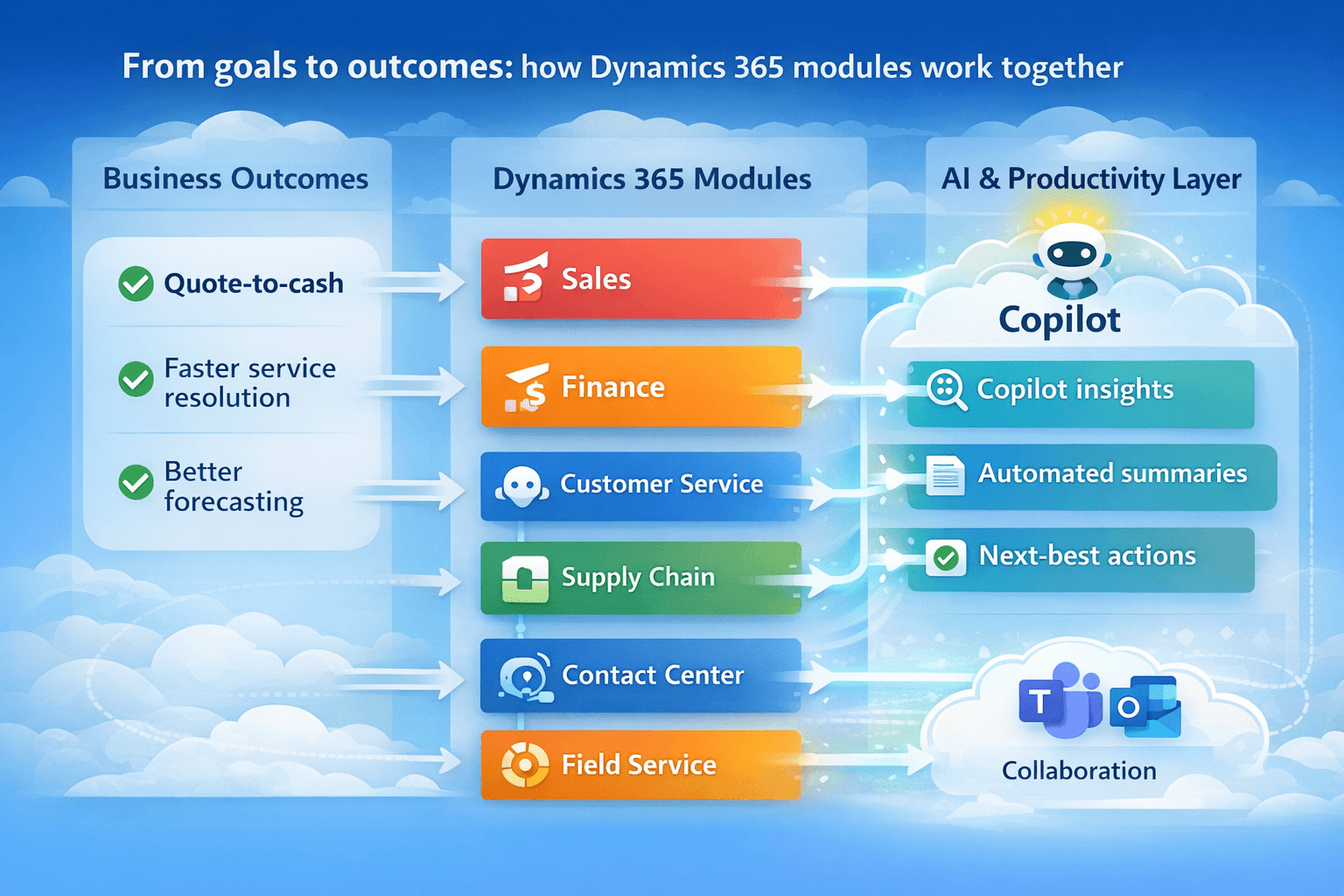
List three outcomes you must move on in the next 12–18 months. For example: shorten quote-to-cash, reduce service response time, or improve forecast accuracy. This keeps the scope focused and makes module choice obvious.
Step 2: Identify gaps across finance, CRM, supply chain, and AI
Map outcomes to capabilities. Quote-to-cash often points to Sales, Finance, and Project Operations or Commerce. Service response time points to Customer Service and Contact Center with knowledge and self-service. Accuracy and planning improvements point toward Finance and Supply Chain with Copilot-assisted analytics.
Step 3: Map modules to existing tools
Inventory your analytics and automation stack. If you already run Power BI, Power Automate, and Teams, you will get faster adoption by leaning into Dataverse and Power Platform patterns like dual-write, virtual tables, and business events.
Step 4: Check scalability and future-proofing
Confirm that your chosen modules are in Microsoft’s active release plan, and scan deprecations to avoid surprises. This is especially important for contact center investments and marketing automation, which have evolved a lot in 2024–25.
OMI’s quick selection advice for growing companies: Start small with one or two modules mapped to your top priorities, choose prebuilt templates and connectors, and expand once the team is comfortable. Keep licensing flexible for seasonal or project users.
Microsoft D365 Modules Pricing & Licensing
Licensing is where many teams overpay. Here is the short version.
License types you will encounter
User licenses for full users, device licenses for shared stations such as kiosks or warehouse terminals, and tenant licenses for org-wide capabilities like certain marketing or survey features. Team Member licenses give light users read or task-based access at a lower cost.
Base and attach strategy
When a user needs multiple apps, the highest-priced app becomes the base license, and additional apps can be added as discounted attach licenses for that same user. Microsoft’s 2025 licensing guide documents the rule and the current change log. The practical impact is that cross-functional roles can cost far less than buying every app at full price.
Contact Center and Customer Service entitlements
Microsoft publishes entitlements like unified routing and voicebot minutes in the licensing guide. If you plan digital or voice channels, check these pools and your expected volumes during design to avoid overages.
Representative pricing reference
Microsoft lists module pricing on product pages. For example, Customer Service shows tiered pricing for Professional, Enterprise, and Premium, along with a separate Contact Center user SKU. Always validate pricing for your region and agreements.
Common scenarios we see
- Full users who work across apps use a base plus attach mix, often Finance or Supply Chain as the base with Sales or Customer Service attached.
- Light users get Team Member licenses for time entry, approvals, or read access.
- Shared terminals use device licenses in retail or warehouse settings.
- Marketing or feedback scenarios use tenant licenses to cover usage across a team.
OMI tip: If your workforce includes seasonal or project-only staff, budget month-to-month licensing to keep costs elastic.
Future Trends: What’s Next for Dynamics 365 Modules?
- AI everywhere : Release Wave 1 and Wave 2 for 2025 introduced more agentic Copilot features across Sales, Customer Service, Contact Center, Field Service, Finance, and Customer Insights. Expect 2026 to deepen autonomous workflows and insight generation, reducing manual effort further.
- Copilot consolidation and cost simplification : Microsoft is bundling Copilot for Sales, Service, and Finance into Microsoft 365 Copilot, removing extra add-ons for many customers from October 2025. This simplifies rollouts for 2026 and can improve user coverage.
- Real-time customer engagement : Customer Insights continues to lead Microsoft’s data plus activation strategy. Expect more real-time orchestration, tighter integrations to channels, and more embedded intelligence in 2026.
- Mixed reality goes practical : Guides and Remote Assist remain focused on tangible productivity, particularly in manufacturing and service. Teams mobile now covers scenarios where the old Remote Assist mobile app was used.
- Verified market momentum : Independent market analysis predicts continued Dynamics growth and solid ROI indicators for ERP rollouts, which aligns with what buyers want in 2026: faster payback and measurable outcomes. Forrester’s TEI reports cite triple-digit ROI figures for Dynamics 365 ERP within three years for composite organizations. Use these studies as directional benchmarks during your business case.
Conclusion
Dynamics 365 is modular by design. In 2026, you can assemble a right-sized stack that meets today’s goals while keeping room to grow. Focus on outcomes, pick the fewest modules that move those outcomes, integrate with Dataverse and Power Platform from day one, and use the base plus attach licensing model to control cost. With Copilot now embedded across the suite, the payback story for many teams has improved, especially where sellers, agents, or planners spend time on repetitive work.
If you want a second set of eyes, OMI can help you map goals to modules, stage your rollout, and tune licensing so you are not overbuying seats or entitlements.
Frequently Asked Questions (FAQs)
- How many modules are available in Dynamics 365?
Microsoft ships a portfolio that spans ERP and CRM, including Sales, Customer Service, Contact Center, Field Service, Finance, Supply Chain Management, Project Operations, Human Resources, Commerce, Business Central, and Customer Insights for data and journeys. The exact list evolves with each release wave, so always check the current plan.
- Which Dynamics 365 module is best for finance and accounting?
Dynamics 365 Finance is the financial core. Many organizations pair it with Supply Chain Management or Project Operations, depending on their model.
- Can ERP and CRM modules work together in Dynamics 365?
Yes. That is the point of Dataverse and dual-write. Finance and Operations apps connect with Sales and Service, so data stays consistent.
- How is Dynamics 365 licensed, per user or per module?
Both. Most modules are per-user subscriptions. Some capabilities are per device or per tenant. Many customers reduce costs by using a base license plus attaching licenses for the same user.
- How long does it take to implement a Dynamics 365 module?
It varies by scope. Business Central or Sales can be live in weeks with standard templates. Finance or Supply Chain often requires phased programs. Use Microsoft’s release plans and implementation guidance to plan dependencies and timing.
- Is Microsoft phasing out any older Dynamics 365 modules?
Occasionally. For example, Fraud Protection stopped new sales in 2025 with support ending in 2026. Always check deprecations when planning.
Sources and further reading
Customer Insights Journeys and Sales release details for 2025–26.
Microsoft 365 Copilot bundling news relevant to 2026 budgets.
Product pricing references for Customer Service and the general pricing hub.
Mixed Reality modules, Guides, and Remote Assist updates.